

In this case study, Ian Lowe, Senior Lecturer in Policing within the College of Health, Science and Society (CHSS), shares how his Gold Badge project used digital tools to improve the consistency and accessibility of assessor marking guidance across the policing programme.
The UWE Digital Skills Programme (explored in a recent article on Building digital confidence at UWE) recognises staff development across three levels: Bronze, Silver and Gold. While the Bronze and Silver badges focus on developing digital capability through a series of learning modules, to achieve the Gold badge participants are required to apply their learning to a real-world project that solves a challenge in their area of work.
Introduction
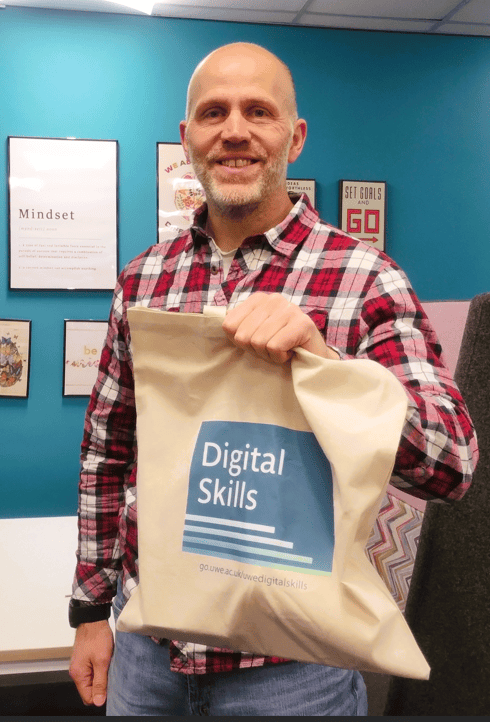
I am a Senior Lecturer in Policing within the College of Health, Science and Society (CHSS), and I completed the Bronze and Silver badges on UWE’s Digital Skills Programme a while ago. After finishing my master’s degree, I was looking for my next professional development opportunity, so the Gold badge seemed like the obvious next step.
I’ll admit that I approached it with some hesitation. I’d heard it involved a huge amount of work and a daunting assessment, but I soon realised those rumours were unfounded. The project is built around something you’re already doing, or something you’d like to improve, which makes it both manageable and genuinely worthwhile. Looking back, it was a much more enjoyable and rewarding experience than I’d expected.
At the time, I was leading the Evidence-Based Policing Research module, the dissertation module on the Police Constable Degree Apprenticeship (PCDA) programme. My assessment project involved creating a practical solution to a challenge we were facing with assessment and marking. My idea has turned out to be a simple and effective way of sharing marking guidance that has made the process more consistent, accessible and efficient for everyone involved.
The problem
The policing programme relies on a number of assessors contributing to the marking process, including associate lecturers who often balance marking responsibilities with other professional commitments. This meant it was not always possible to bring everyone together for standardisation meetings. These are sessions held before marking begins to ensure all assessors have a shared understanding of the assessment, marking criteria, feedback expectations and marking processes. Usually, guidance was shared through Teams meetings and information sessions, but running multiple sessions to accommodate different schedules often led to different questions and discussions, creating the potential for inconsistencies in how information was communicated and understood.
It also meant that the same guidance had to be repeated multiple times which resulted in additional workload for the programme team. But we needed to make sure all assessors are on the same page regarding expectations. For example, it is acceptable for a student to give a personal experience from their professional experience if this was part of the process for deciding their research topic. This is not always normal in academic research. Not everyone would know that this was acceptable. Consistent guidance helps ensure that students receive a fair, transparent and reliable marking experience, regardless of who marks their work.
The solution
To address the issue, I created a 15-minute assessor information video and shared it with assessors along with supporting documentation in a dedicated SharePoint site.
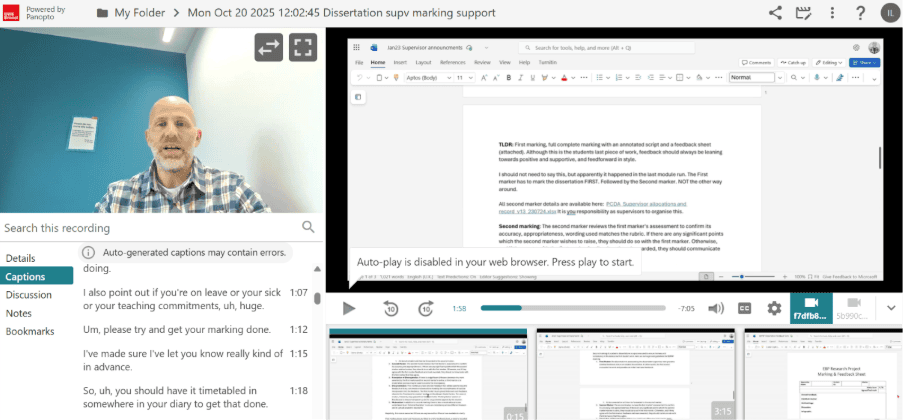
The video was uploaded on to Panopto and provided clear guidance on key aspects of the marking process – it could be accessed whenever assessors need it. It was “one source of truth” for assessor information.
The digital format offered much greater flexibility than the traditional information sessions. New assessors could review the materials at a convenient time, while experienced assessors could revisit specific guidance as required. As processes evolved the content could also be updated quickly without the need to arrange additional meetings.
Challenges encountered
One challenge was deciding how best to record the guidance. I explored different options, including PowerPoint, but ultimately chose Panopto because it allowed me to share my screen and demonstrate processes as I talked through them. This meant I could show assessors exactly how to access Blackboard, where to upload feedback and how the marking workflow operated. For me, that was much closer to the experience of a live standardisation session than a set of presentation slides, and it made the guidance more practical and easier to follow. Initially, I found recording in Panopto a little unusual because, you are sitting there talking to yourself, but it worked well.
Feedback from staff and students
Feedback from colleagues has been overwhelmingly positive. Assessors have welcomed having access to standardised guidance regardless of whether they are able to attend an information session. The videos provide reassurance that everyone is working from the same information and expectations.
The policing team has also benefited from the reduced need to organise and deliver multiple assessor briefing sessions. The time we previously spent repeating the same information can now be redirected into supporting assessment quality and student learning.
While students may not interact directly with the SharePoint resource, they benefit from a more consistent marking process and a clearer approach to assessment across the programme.
Next steps
I have already continued using this approach on the same module and plan to use it again on a new module starting in September. One area I’d like to explore further is using Panopto analytics to understand who has watched the videos and how they are being used. During the project, I didn’t check whether assessors had accessed the recordings, so gaining better insight into engagement would be valuable.
I’m also considering breaking the original 15-minute video into a series of shorter, more focused videos so that returning markers can access only the information they need, rather than watching the entire recording again. The overall aim is to make the guidance even more accessible and useful for assessors while maintaining a consistent approach to marking.
Note you can access Panopto viewer user stats from a video you are an owner of via the three dots on the right-hand side. This can be done from grid view or the full screen.  |
Top tips for colleagues
- Don’t be put off by the Gold badge. It’s more achievable than you might think, especially if you build your project around something you already want to improve.
- Start with a real challenge. Focus on a genuine issue that affects staff or students and use digital tools to help solve it.
- Prioritise consistency. A simple digital resource can help ensure everyone receives the same guidance and information.
- Use screen recordings to demonstrate processes. Showing people what to do can be more effective than written instructions alone.
- Keep it simple. You don’t need a complex solution, sometimes a straightforward resource can have the biggest impact.