

This post has been written by Senior Digital Learning Designer Robyn Weeks, who worked closely with Lecturer in Diagnostic Radiography Bigboy Rakata based in the School of Health and Social Wellbeing.
As part of our ongoing exploration into assessment within Blackboard Ultra, we recently supported Bigboy Rakata in piloting Ultra Forms as a lightweight portfolio tool on his ‘Anatomy and Pathology in Cross-Sectional Imaging’ professional short course.
While Blackboard Forms are often used for collecting student information, evidence gathering or written activities, this reflection shows how they can work surprisingly well for small, structured portfolios, with some important caveats.
How Blackboard Forms was used
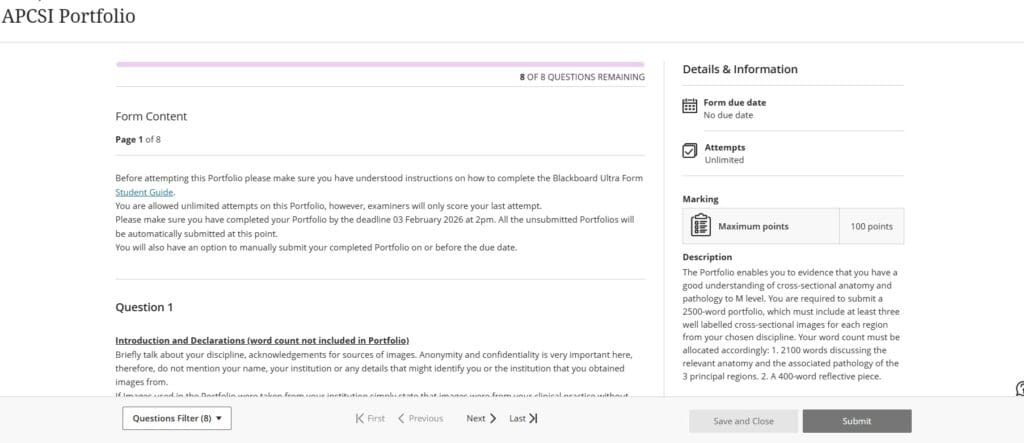
The specific assessment requires students to submit a short portfolio made up of several structured sections (three well labelled cross-sectional anatomy images; a discussion of the relevant anatomy and the associated pathology of the 3 principal regions; and 400-word reflective piece). The form provided:
- Text boxes for each required section
- Spaces where students could insert images
- A single submission point where all work was housed
- The ability to save and return to the form later
The intention was that students would type directly into the provided boxes and upload images inline.
Unlike many other healthcare portfolios, the ‘Anatomy and Pathology in Cross-Sectional Imaging’ Portfolio does not require iterative feedback or competency completion from an external source, such as a placement. Note that Ultra Forms does not support external assessor use, so where a placement or workplace supervisor is required to complete elements of a portfolio, PebblePad tends to be the most appropriate platform to use.

Benefits of using Forms
Clear, consistent structure: Forms guided students to complete work in a standardised way, which greatly supported consistent use as well as marking.
Streamlined marking workflow: Markers could navigate each section easily, and in this small cohort, downloading any attached documents was manageable.
Lower learning curve than other portfolio platforms: For small assessments with only a few structured questions, Forms is more appropriate than complex tools like PebblePad, which require extensive onboarding.
Limitations and challenges
While the experiment showed promise, several limitations surfaced.
Students used the Form in mixed ways: Despite instructions, some students still submitted work as Word attachments instead of typing into the form. Many were returning students who had previously submitted a paper-based portfolio. However, this usage complicated marking, as described below.
Document downloading during marking: For submissions that had been attached as a document, the course team had to download each document during marking. For future runs of the course, clearer communication on how to complete and stricter enforcement may be required.
No live view: Until the Form is submitted, the course team cannot view the contents of the Form. A non-digital solution is for students to show their portfolio on their own device during tutorials.
Word count visibility: Students could see their running word count, but markers could not. This creates challenges for enforcing word limits.
No SafeAssign: SafeAssign is not available when using Ultra Forms.

Final thoughts
Using Blackboard Forms as a portfolio tool won’t suit every programme, but for small, structured submissions it offers a simple, low-barrier option without the need for students to learn a more complex system like PebblePad. As with all digital tools, there are practical limitations. However, many of these can be addressed through clearer guidance, non-digital solutions and continued experimentation.
Resources
Guide for instructors about using Forms in Blackboard Ultra
Guide developed in-house for students Using Forms in Blackboard Ultra (a guide for students at UWE)