

The Digital Learning Service (DLS) is supporting a move to Blackboard Ultra with some programmes moving fully by the start of academic year 2025/26. Paul Redford shares his insights and experiences from using the updated version of Blackboard on his fully online Master’s programme in Education Leadership.
For most of my academic career, I’ve relied on Blackboard to provide resources for the courses I teach. Over the years, my perspective on Blackboard has been consistently critical; I found little to praise about the platform’s ability to support student learning. For the past 20 years, it felt like Blackboard hadn’t evolved — and neither had my opinion of it. That is, until now. Spoiler alert: Blackboard has changed, and so have I. I love Blackboard Ultra.
My experience with Blackboard (or Blackboard Learn, as it’s known) was that it served primarily as a file repository. For staff, this meant uploading PowerPoint slides, uploading Word documents, uploading module guides, providing links to reading lists, links to video lectures, alongside occasional announcements (mostly read via email). For students, the experience was similarly transactional—downloading slides, downloading module guides, opening Talis to view reading lists, opening Panopto to view video lectures. The assessment process mirrored this: students uploaded their work, and staff downloaded it, reviewed it, and uploaded feedback. It was an endless cycle of uploading and downloading with minimal interaction or genuine learning in the platform.
Admittedly you could do other things, embed a video, add content to be read in Blackboard, use discussion boards, run quizzes and assessments. Some staff use these well. I tried my best to use Blackboard to engage students in the process of “learning” while using Blackboard, but frequently ended up frustrated, and mainly ended up with little engagement.
When I was asked to lead a fully online Master’s program in Education Leadership, I was both excited and apprehensive. I was curious about how we would design an interactive, engaging online course; would we use MS Teams, something new? However, my hopes for a new and improved platform were quickly dashed when I learned we would still be using Blackboard.
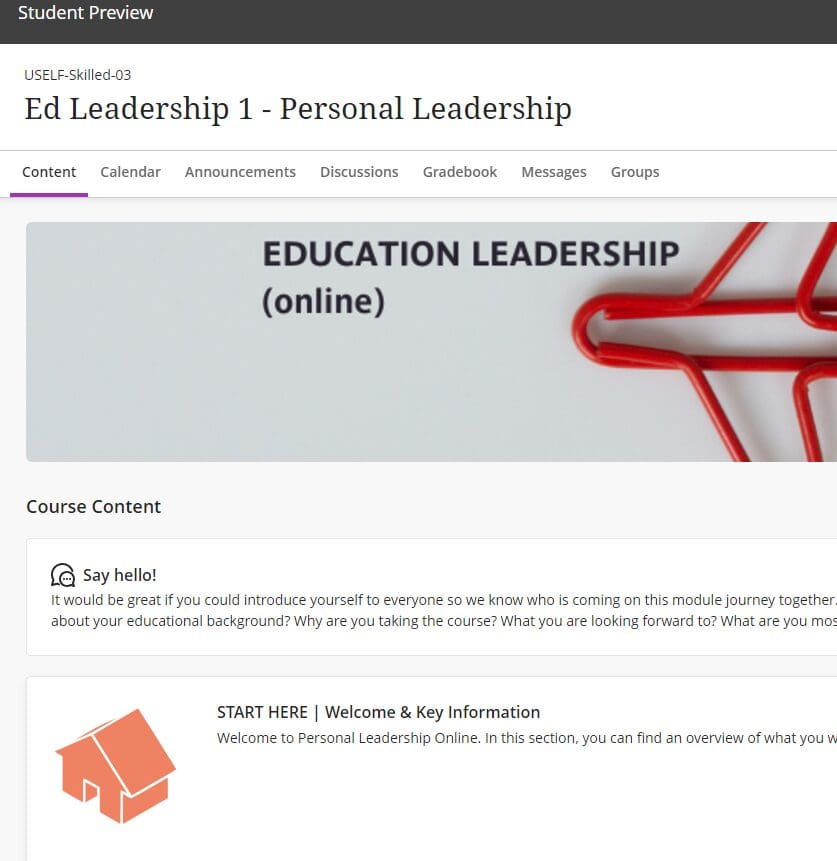
However, Blackboard Ultra was a revelation. It was fresh, intuitive, and encouraged engagement. Navigating the platform was straightforward, and designing content was no longer a chore. I could create visually appealing, interactive material, and student navigation was clear and logical. The platform didn’t just look better; it functioned better, fostering an environment that made students want to stay, learn, and participate.
Discussion boards were easy to manage and inviting to use. Tracking student engagement was seamless, with clear analytics that offered insights into how students interacted with the content. For the first time, I felt that Blackboard was enabling true learning, not just acting as a digital filing cabinet. I found myself enjoying the process of creating and interacting within the platform, shifting from finding workarounds to genuinely exploring new possibilities.
The above video From Critic to Champion – how Blackboard Ultra changed my view on Blackboard was presented at a CHSS Good Practice (GPS) session on 27th November 2024.
I still wondered though; would students find it as engaging as I did? The answer came swiftly and subtly—they didn’t mention the platform at all. And that, I realised, was the ultimate sign of success. A good platform should be invisible, allowing students to focus on learning without being distracted by navigation issues or technical hurdles. In the first week of the module, students were already posting in discussion boards without prompts or nudges. I received zero emails asking where to find materials or how to complete tasks. They were engaging, participating in reflection exercises, and responding thoughtfully to one another’s posts. It was like finding a good parking space —something you only notice when it’s missing.
For the first time in two decades, I can confidently say that Blackboard supports student learning, and I am excited to continue using it.
Blackboard Ultra’s design compelled students to stay within the platform to engage with content. Weekly activities were structured to include preparation (reading or watching content), practice (applying new knowledge), participation (sharing experiences and collaborating), production (working on assessments), and pondering (exploring topics further). While I couldn’t track every aspect of student engagement, the participation element provided a clear window into their involvement. Unlike my previous attempts with Blackboard Learn, the students’ posts in Ultra were thoughtful and detailed. Of course some students engaged more than others, but overall, participation was consistent and meaningful. I could easily monitor student activity, respond to posts, and access analytics to inform my teaching strategies. This allowed me to spend less time navigating the system and more time focusing on what truly mattered—creating high-quality, engaging activities.
With Blackboard Ultra, I no longer dreaded logging into the platform. Instead, I looked forward to it. The process of responding to students, checking engagement stats, and refining content was seamless. Ultra felt like a genuine learning tool where students could think, engage, and collaborate. It allowed for quick responses, deep reflections, and longer, meaningful discussions—all essential components of an effective learning experience. For the first time in two decades, I can confidently say that Blackboard supports student learning, and I am excited to continue using it. I finally have new hope for how we support students with real learning in a virtual environment.