

Alison Arrowsmith, Senior Midwifery Lecturer,
School of Health and Social Wellbeing
I am Module Lead for the Year 1 Practice module, as well as supporting students as an Academic Professional Midwifery Advocate. I also co-lead the Year 3 Midwifery Electives and have helped to develop future international learning opportunities as I have a particular interest in sustainability. I submitted this Sharepoint project to achieve my gold award in the UWE Digital Skills Programme.
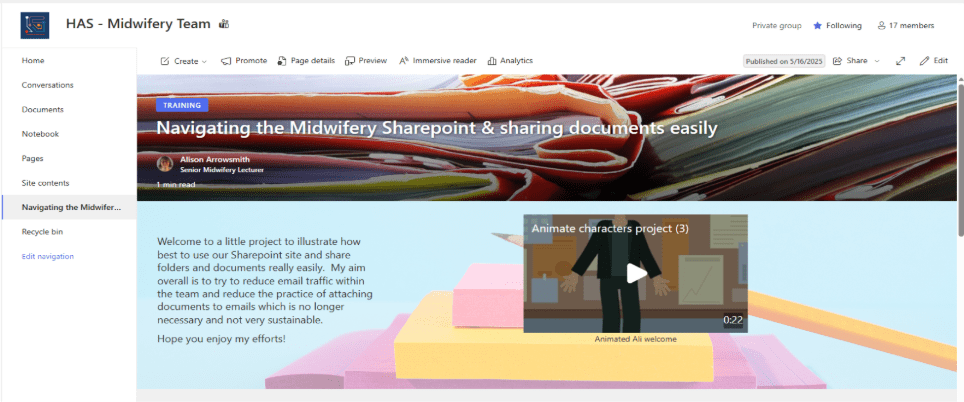
In today’s fast-paced healthcare and education environments, effective collaboration isn’t just a convenience, it’s essential to delivering safe, high‑quality work. In 2024, we led a project to design, develop, and implement a new staff SharePoint site for our team, accompanied by structured training and ongoing support. This initiative wasn’t just about introducing a new platform; it was about creating a digital space that brought people, knowledge, and resources together in a way that genuinely enhances our daily work.
Why we needed change
Before the project began, our team faced several familiar challenges. Information was scattered across personal drives, email attachments, and various legacy folders. Staff often spent unnecessary time searching for documents or clarifying which version was the most up‑to‑date, especially if it had been attached to an email. Collaboration, particularly on shared resources, was sometimes slowed by duplication, inconsistent formats, or delays in accessing essential materials with a mystifying and unwieldly legacy SharePoint.
It became clear that we needed a single, well‑structured, and dependable space where staff could access what they needed, contribute to shared work, and feel supported in using digital tools confidently. SharePoint provided the perfect opportunity to make this happen and met the wider UWE requirements of robust security, information governance and easy integration with the other Microsoft tools that the university uses (Reef, 2024).
Sharing documents via Sharepoint also reduces unnecessary internal email traffic helping reduce our carbon footprint. Excessive emails with attachments have a measurable carbon footprint. Mike Berners-Lee, in his 2020 book ‘How Bad are Bananas?: The Carbon Footprint of Everything’, estimates that a spam email might create 0.03g CO2e, but a long email which might take 10 mins to write and 3 mins to read could create 17g CO2e! (Berners-Lee, 2020) How many emails do you send each day, that could be a file link on Teams instead?, worth a thought…
Designing a SharePoint site with people in mind
From the start, we wanted the site to be intuitive, easy to navigate, and genuinely useful to the team. To achieve this, we began with a listening phase: speaking with colleagues, gathering feedback, and understanding the specific annoyances people encountered in their day‑to‑day roles. These conversations shaped the site’s architecture and ensured that the final product responded directly to real needs. We designed a simple map of the SharePoint so that everyone could see where things were and how to navigate the SharePoint before it was launched, this was revised after consultation with the team.
The SharePoint site developed into a central hub that included:
- Clearly defined document libraries with logical folder structures
- Automated version control to eliminate the confusion of outdated files
- Dedicated spaces for guidance, policies, teaching materials, and resources
- Quick‑access links to frequently used tools and systems on the Home page
- Search‑optimised metadata so staff could find documents faster
The emphasis throughout was simplicity, consistency, and clarity.
Building confidence through training
A well-designed digital space only works when people feel supported and confident in using it. Fear of change and lack of digital confidence can make people resistant to using new tools (Cser, 2023). Recognising this, I created a comprehensive training programme tailored to different levels of digital experience within the team.
The training included:
- Hands‑on workshops introducing core SharePoint features
- Step‑by‑step guides for uploading, editing, and sharing documents
- Short video tutorials for quick reference
- Drop‑in sessions for staff who preferred one‑to‑one guidance
The aim was to demystify SharePoint, reduce anxiety around digital change, and build skills gradually. Staff feedback highlighted that the combination of practical demonstrations and accessible support materials helped them feel more capable, and even enthusiastic, about using the new platform. We were available to staff at any time if they were stuck with a problem, in person or on Teams.
Providing ongoing support
Digital transformation doesn’t end at launch. To ensure the SharePoint site remained sustainable and useful, I established an ongoing support model. This included regular updates, opportunities for staff to suggest improvements, and continuous monitoring of document organisation and usage patterns.
Impact on our team’s efficiency and collaboration
Since implementing the new SharePoint site, we’ve seen meaningful improvements in the way we work together. Staff can now:
- Locate documents quickly and reliably
- Collaborate in real time without version conflicts
- Access centralised teaching and operational resources
- Reduce duplication and save time previously spent searching for information
- Feel more confident and digitally empowered
The ripple effect has been significant: more streamlined workflows, fewer miscommunications, and a shared sense of ownership over our digital workspace.
Looking ahead
The SharePoint project has been a rewarding opportunity to strengthen our team’s digital foundations and support a culture of efficiency and collaboration. As we continue to update the site, gather feedback, and adapt to evolving needs, the platform will grow alongside us.
Ultimately, this project wasn’t just about technology – it was about people. By creating tools that make our work easier, clearer, and more connected, we’ve built a foundation that allows us to focus more fully on the priorities that matter most.
I hope that as people feel more confident we can make more use of the SharePoint and embed more digital tools to make running the programme easier and more efficient.
References
- Berners-Lee, M. (2020) How Bad are Bananas?: The carbon footprint of everything. 2nd edn. [e-book]. United Kingdom: Profile Books. [Accessed 1 June 2026].
- Cser, T. (2023) How to Build Stakeholder Buy-In for Digital Transformation. Functionize. 31 May 2023 [online]. Available from: https://www.functionize.com/blog/how-to-build-stakeholder-buy-in-for-digital-transformation [Accessed 2 June 2026].
- Reef, S. (2024) Why Migrate to SharePoint Online: 9 Key Benefits. Silicon Reef. 10 July 2024 [online]. Available from: https://siliconreef.co.uk/blog/why-migrate-to-sharepoint-online/ [Accessed 1 June 2026].