

Jon White is a Senior Lecturer in Cyber Security in the School of Computing and Creative Technologies. For the past two years, Jon has redesigned technical lab worksheets so that they teach students who cannot always be in the room, and support the tutors who run the labs..
This case study draws on Secure Computer Networks, a Level 5 cyber security module of around 175 students a year, during 2024/25 and 2025/26. Labs are facilitated by a mix of associate lecturers, colleagues new to the module and experienced staff. Each lab sits alongside a lecture and a weekly formative quiz in Blackboard Ultra.
The problem
Lab teaching relies on two assumptions: the student is in the room, and an experienced tutor is nearby. Neither is safe any more.
Many of our students hold paid jobs, commute long distances or care for family. They are not disengaged from learning, but they are often absent from the lab. When they work through a lab sheet at home, nobody is there to explain the confusing step.
The person running the lab is not the module leader either. It may be an associate lecturer facilitating a lab they have never sat themselves, or a colleague new to the module.
A lab sheet plus an expert nearby makes a working lab. Take the expert away and you find out how much of the teaching was never written down. That is a design flaw, not a student failing.
The evidence was direct, survey feedback on an earlier version of the module and its materials, before I took it on, described the labs as overwhelming and confusing.
The solution
I rebuilt each lab sheet to do three jobs.
It fades support for the student. Each worksheet moves through four stages: a walkthrough (I show you), guided practice (we investigate), a challenge (you work it out) and independence (you explain). In one three-hour lab on Message Queuing Telemetry Transport (MQTT), the protocol behind many smart-home devices, students first watch a working heating system’s network traffic. They then restore the lights on a smart home unaided, and finally threat-model and harden it. Every task ends with a reflection question, because completing a task is not evidence of understanding it.

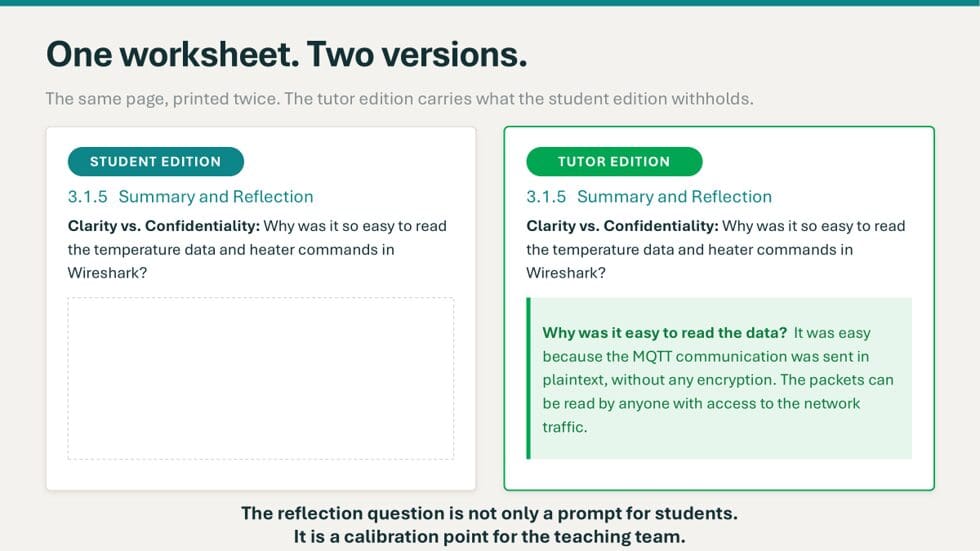
It comes with a tutor edition. Each worksheet comes in two editions. The student edition asks the question; the tutor edition is the same page with guidance underneath. That guidance is more than an answer key. It sets out what students should produce, the answer, what they should also notice, and what a strong answer sounds like, so a first-time tutor knows when to push.
It is checked by a weekly quiz. For students who missed the lab, each week ends with a short formative quiz in Blackboard Ultra, drawn from the lecture and the lab. It is marked instantly with feedback and allows unlimited attempts. Students see what to revisit, and I see where the cohort stalled.

Challenges
Keeping the two editions in step. I write the tutor edition first, then cut the extra sections to make the student edition. That works, but every later correction has to be made twice, and the two editions drift apart. Producing both from one source file, with a single setting that switches the tutor notes on or off, would remove that step.
Getting the level of support right. The same failure can happen on both sides of the bench. Too much support for students removes the productive struggle that makes learning stick. Too much guidance for tutors turns facilitation into script-reading, and a very detailed tutor edition can de-skill an experienced tutor. I now aim for tutor notes that explain the judgement behind an answer, not a script to read out.
Time. A tutor edition means thinking through, in advance, the talking points and the places where students tend to get stuck, and writing them down. That takes time up front, but it saves answering the same question in every session and briefing every new tutor from scratch.
Feedback from staff and students
After the redesign, students on the same module described the labs as “well run and easy to follow”, while feedback on the rest of the module stayed the same. The pass rate across both assessments rose from about 60% to about 90%, although this followed a wider redesign, not the worksheets alone. New tutors now facilitate to a consistent standard from their first session. Colleagues adopted the format voluntarily before the cyber security cluster made it standard for all undergraduate lab modules in 2026/27.
A colleague who adopted the template for a Level 4 Digital Forensics module reported that, for less experienced colleagues, “the structured format increased their confidence in delivering computer lab sessions”.
Next steps
I have mapped every lecture and lab on Secure Computer Networks to the UK Cyber Security Council’s Cyber Career Framework, and the worksheets now show students which job roles and skills each task develops. Threat-modelling the smart home, for example, is the kind of work a security engineer or penetration tester does. The next step is to test whether the results hold beyond my own module, using attainment data now being gathered from colleagues’ modules.
Top 5 tips
- Write the tutor edition first. Thinking through the talking points and sticking points first is what makes the student edition worth reading.
- Keep one source, two outputs. Cutting a copy by hand works, but the editions drift apart over time. Produce both from the same file instead.
- End each task before the thinking ends. Add a short “why did that happen?” question after each practical step.
- Fade the support deliberately. Decide where the walkthrough stops and the challenge begins.
- Close the loop with a quiz. A short, auto-marked weekly quiz tells absent students what to revisit, and tells you where the cohort is stuck.
Which of your own worksheets would still work if nobody were there to explain them?